
JWTs and Signing Keys
Learn about Wristband's JWT structure, token claims, signature verification, and signing-key management.
Overview
Wristband issues JSON Web Tokens (JWTs) to represent authenticated users and OAuth2 clients. Applications can use these tokens to identify the authenticated subject and, where appropriate, authorize access to protected resources.
A signed JWT contains three Base64URL-encoded components separated by periods:
<header>.<payload>.<signature>
- Header: Identifies the token type, signing algorithm, and signing key.
- Payload: Contains claims about the authenticated subject.
- Signature: Allows recipients to verify that the token was signed by the expected issuer and has not been modified.
JWT Header
The JWT header is a Base64URL-encoded JSON object containing metadata needed to interpret and verify the token. Wristband access tokens and ID tokens include the following fields:
kid(Key ID): Identifies the signing key. Your application uses this value to select the matching public key from Wristband's JSON Web Key Set (JWKS).alg(Algorithm): Identifies the signing algorithm. Wristband signs access tokens and ID tokens usingRS256(RSA with SHA-256).typ(Type): Identifies the token type so that applications can distinguish tokens intended for different purposes.
typ Value | Token Type |
|---|---|
at+JWT | Access token |
id+JWT | ID token |
The following is an example of a JWT header for a Wristband access token:
{
  "kid": "r44ow3paz5crpm5dgvuaerhs2a",
  "typ": "at+JWT",
  "alg": "RS256"
}
JWT Payload
The JWT payload is a Base64URL-encoded JSON object containing claims about the subject and the token. The available claims depend on whether the token represents a user or an OAuth2 client, and whether it is an access token or an ID token.
Access Token Payload
Wristband access tokens are short-lived JWTs that applications can present when calling protected APIs. Their claims identify the authenticated subject and provide context that APIs can use when enforcing authorization.
The sub_kind claim identifies which kind of subject the token represents:
| Subject Kind | Description |
|---|---|
| user | A human user |
| application_client | An OAuth2 client owned at the application level |
| tenant_client | An OAuth2 client owned at the tenant level |
User Access Tokens
Example access token payload for an authenticated user:
{
  "sub": "dgduqyd42veeffcex6nulzfpba",
  "idp_name": "wristband",
  "van_dom": "yourapp-yourorg.us.wristband.dev",
  "amr": [
    "pwd"
  ],
  "iss": "https://yourapp-yourorg.us.wristband.dev",
  "client_id": "nfqsd5qs4jflzkmhe5ambkieky",
  "tnt_id": "ephrgbr36zgbrplbwi7dkqweui",
  "scope": "openid offline_access",
  "auth_time": 1697517244,
  "is_root_app": true,
  "sub_kind": "user",
  "exp": 1697519044,
  "app_id": "m7k55onh6nbsjggayhubbef4eq",
  "iat": 1697517244,
  "jti": "alltndyuhfcmdbf4ow7zuzs6hq",
  "custom_claims": {
    "claim_a": "foo",
    "claim_b": "bar"
  }
}
The following claims are included in user access tokens:
| Claim | Format | Description |
|---|---|---|
| amr | array of strings | List of authentication method references indicating how the user authenticated. Currently supported methods include:
|
| app_id | string | The ID of the application associated with the access token. For a user subject, this is the ID of the application that the user belongs to. |
| auth_time | number | Time at which the user authenticated, represented as the number of seconds since the Unix epoch. |
| client_id | string | The ID of the OAuth2 client that was used to create the token. |
| custom_claims | object | An object containing configured custom claims. |
| exp | number | The time at which the access token should expire, represented as the number of seconds since the Unix epoch. |
| iat | number | The time at which the access token was issued, represented as the number of seconds since the Unix epoch. |
| idp_name | string | The name of the identity provider that the user belongs to. |
| is_root_app | boolean | Internal field used by Wristband. |
| iss | string | A URL in the format https://<application_vanity_domain>. |
| jti | string | A unique identifier for the token. |
| scope | string | A space-separated string containing the scopes granted to this token. |
| sub | string | The ID of the user that was authenticated. |
| sub_kind | string | The kind of subject the token is for. For a user subject, the value is user. |
| tnt_id | string | The ID of the tenant associated with the access token. For a user subject, this is the ID of the tenant that the user belongs to. |
| van_dom | string | The vanity domain that was used when calling the token endpoint. |
Application-Level Client Access Tokens
Example access token payload for an application-level client:
{
  "sub": "cdgqsdk3mrbfvidlrotm2a4eiu",
  "van_dom": "yourapp-yourorg.us.wristband.dev",
  "iss": "https://yourapp-yourorg.us.wristband.dev",
  "sub_kind": "application_client",
  "exp": 1697674367,
  "app_id": "4satxbaxb5fjncfsqzngnwwswi",
  "iat": 1697587967,
  "jti": "bjgjhrf5jregdjxjcxp4i7ckfe",
  "client_id": "cdgqsdk3mrbfvidlrotm2a4eiu",
  "custom_claims": {
    "claim_a": "foo",
    "claim_b": "bar"
  }
}
The following claims are included in application-level client access tokens:
| Claim | Format | Description |
|---|---|---|
| app_id | string | The ID of the application associated with the access token. For a client subject that is owned by an application, this will be the application that owns the client. |
| client_id | string | The ID of the OAuth2 client that was used to create the token. |
| custom_claims | object | An object containing configured custom claims. |
| exp | number | The time at which the access token should expire, represented as the number of seconds since the Unix epoch. |
| iat | number | The time at which the access token was issued, represented as the number of seconds since the Unix epoch. |
| iss | string | A URL in the format https://<application_vanity_domain>. |
| jti | string | A unique identifier for the token. |
| sub | string | The ID of the client that was authenticated. |
| sub_kind | string | The kind of subject the token is for. For an application-level OAuth2 client, the value is application_client. |
| van_dom | string | The vanity domain that was used when calling the token endpoint. |
Tenant-Level Client Access Tokens
Example access token payload for a tenant-level client:
{
  "sub": "h3cdthdxordi3n2jlcobz7mvw4",
  "tnt_id": "rztradojyfc47f74d3fh5fylre",
  "van_dom": "yourapp-yourorg.us.wristband.dev",
  "iss": "https://yourapp-yourorg.us.wristband.dev",
  "sub_kind": "tenant_client",
  "exp": 1697677760,
  "app_id": "4satxbaxb5fjncfsqzngnwwswi",
  "iat": 1697591360,
  "jti": "54eoa4aiybe5zgqdf67jskdyue",
  "client_id": "h3cdthdxordi3n2jlcobz7mvw4",
  "custom_claims": {
    "claim_a": "foo",
    "claim_b": "bar"
  }
}
The following claims are included in tenant-level client access tokens:
| Claim | Format | Description |
|---|---|---|
| app_id | string | The ID of the application associated with the access token. For a client subject owned by a tenant, this will be the application that the tenant client belongs to. |
| client_id | string | The ID of the OAuth2 client that was used to create the token. |
| custom_claims | object | An object containing configured custom claims. |
| exp | number | The time at which the access token should expire, represented as the number of seconds since the Unix epoch. |
| iat | number | The time at which the access token was issued, represented as the number of seconds since the Unix epoch. |
| iss | string | A URL in the format https://<application_vanity_domain>. |
| jti | string | A unique identifier for the token. |
| sub | string | The ID of the client that was authenticated. |
| sub_kind | string | The kind of subject the token is for. For a tenant-level client, the value is tenant_client. |
| tnt_id | string | The ID of the tenant that owns the client. |
| van_dom | string | The vanity domain that was used when calling the token endpoint. |
ID Token Payload
An ID token contains claims about the authenticated user and the authentication event. Unlike an access token, an ID token is not intended to authorize requests to protected APIs. ID tokens are only intended to provide information about the authenticated subject to your application.
Example ID token payload for an authenticated user:
{
  "at_hash": "IhchIEvr_qd35VVhW2V3Xg",
  "sub": "dgduqyd42veeffcex6nulzfpba",
  "idp_name": "wristband",
  "amr": [
    "pwd"
  ],
  "iss": "https://yourapp-yourorg.us.wristband.dev",
  "auth_flow": "authorization_code",
  "nonce": "jPy_qLTHFbT1kisduhYgXREVvpY9RPRk97YSywHpk_A",
  "sid": "4glkn7jfqzbdvfycwa6uwhfmry",
  "rt_hash": "xhI6JZLwpvfxltdjtseyHQ",
  "aud": "nfqsd5qs4jflzkmhe5ambkieky",
  "tnt_id": "ephrgbr36zgbrplbwi7dkqweui",
  "auth_time": 1697587898,
  "exp": 1697589698,
  "app_id": "m7k55onh6nbsjggayhubbef4eq",
  "iat": 1697587898,
  "jti": "gzqma35o4nbrnnjrujlpdsxknu",
  "custom_claims": {
    "claim_a": "foo",
    "claim_b": "bar"
  }
}
The following claims are included in ID tokens:
| Claim | Format | Description |
|---|---|---|
| amr | array of strings | List of authentication method references indicating how the user authenticated. Currently supported methods include:
|
| app_id | string | The ID of the application that the user belongs to. |
| at_hash | string | The hash of the access token. An application can calculate the at_hash from its access token and compare it to the one in the ID token to ensure token authenticity and integrity. |
| aud | string | The OIDC spec allows for the aud claim format to be either a string or an array of strings. In Wristband, the aud value will always be a string, and the value should always contain the ID of the OAuth2 client that initiated the authorization request. |
| auth_flow | string | Represents which authentication flow was used to produce the ID token. Currently supported flows include:
|
| auth_time | number | Time at which the user authenticated, represented as the number of seconds since the Unix epoch. |
| custom_claims | object | An object containing configured custom claims. |
| exp | number | The time at which the ID token should expire, represented as the number of seconds since the Unix epoch. |
| iat | number | The time at which the ID token was issued, represented as the number of seconds since the Unix epoch. |
| idp_name | string | The name of the identity provider that the user belongs to. |
| iss | string | A URL in the format https://<application_vanity_domain>. |
| jti | string | A unique identifier for the token. |
| nonce | string | The nonce value that was passed in the original authorization request and can be used for verification. |
| rt_hash | string | The hash of the refresh token. An application can calculate the rt_hash from its refresh token and compare it to the one in the ID token to ensure token authenticity and integrity. |
| sid | string | The ID of the auth session associated with the ID token. |
| sub | string | The ID of the authenticated user. |
| tnt_id | string | The ID of the tenant that the user belongs to. |
Refresh Tokens
Wristband refresh tokens are opaque to your application. Do not parse their contents or depend on their internal structure. When a user's access token expires, your application can submit a valid refresh token to the Wristband Token Endpoint using the refresh_token grant type to obtain a new access token.
JWT Signature
Wristband signs access tokens and ID tokens using RS256, an asymmetric signing algorithm that relies on a key pair:
- Private key: Held by Wristband and used to sign tokens.
- Public key: Published by Wristband so applications can verify token signatures.
A valid signature confirms that a token was signed using the corresponding private key and that its signed contents have not been modified.
JSON Web Key Set (JWKS)
A JSON Web Key Set (JWKS) is a standardized collection of public cryptographic keys. Wristband publishes application signing keys through the JWKS Endpoint, allowing your application to retrieve the public keys needed to verify access tokens and ID tokens.
Your application can use the JWT header's kid value to select the appropriate key from the JWKS.
Application-Level Signing Keys
Each Wristband application has its own dedicated signing keys. This limits the impact of a signing-key compromise: a key belonging to one application is not used to sign tokens for another application.
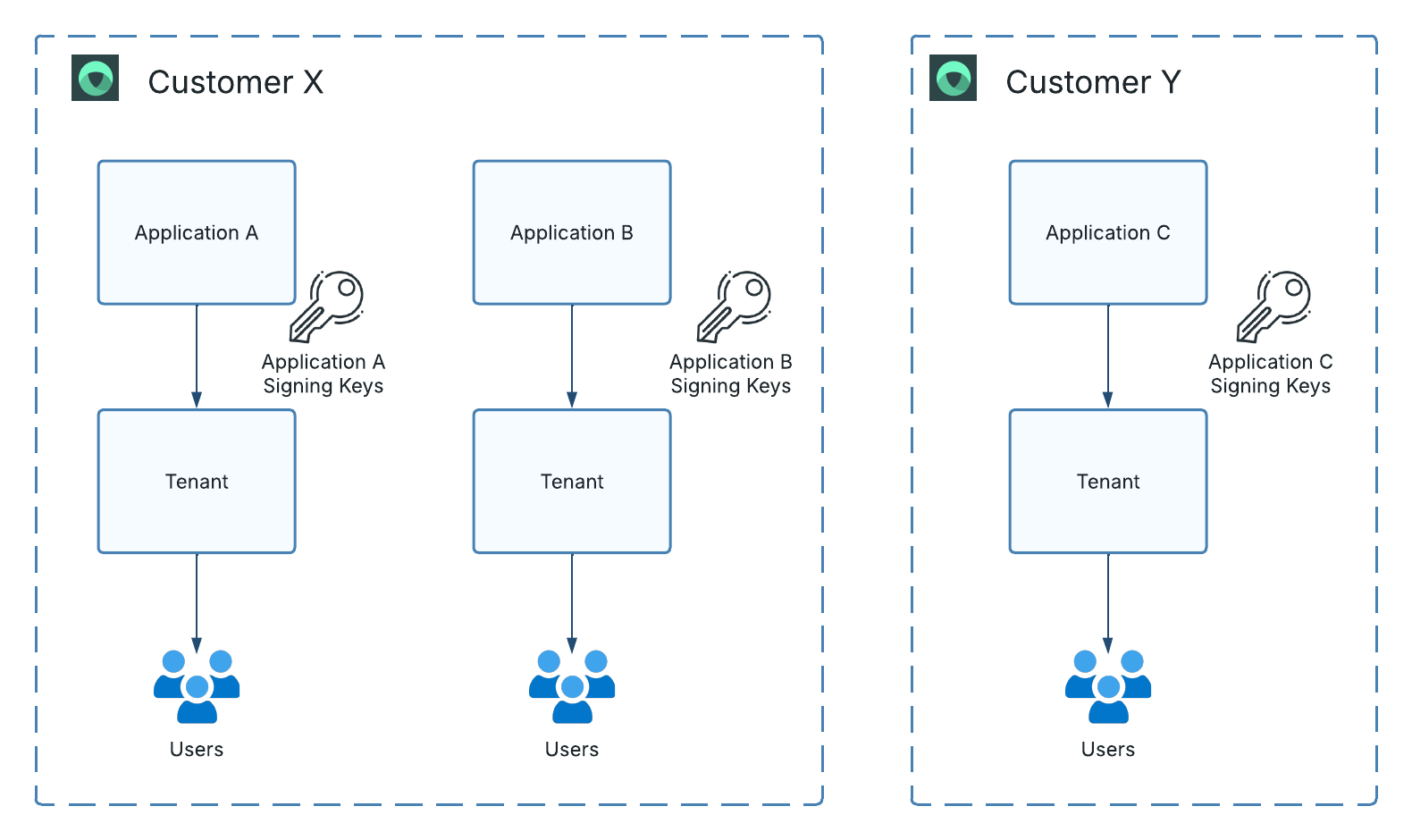
Figure 1: Each Wristband application has an independent set of signing keys.
For example, suppose Customer X operates Application A and Application B in Wristband. If Application A's private signing key is compromised, its tokens could be forged until the affected key is rotated and no longer trusted. However, Application B is unaffected since it uses different signing keys.
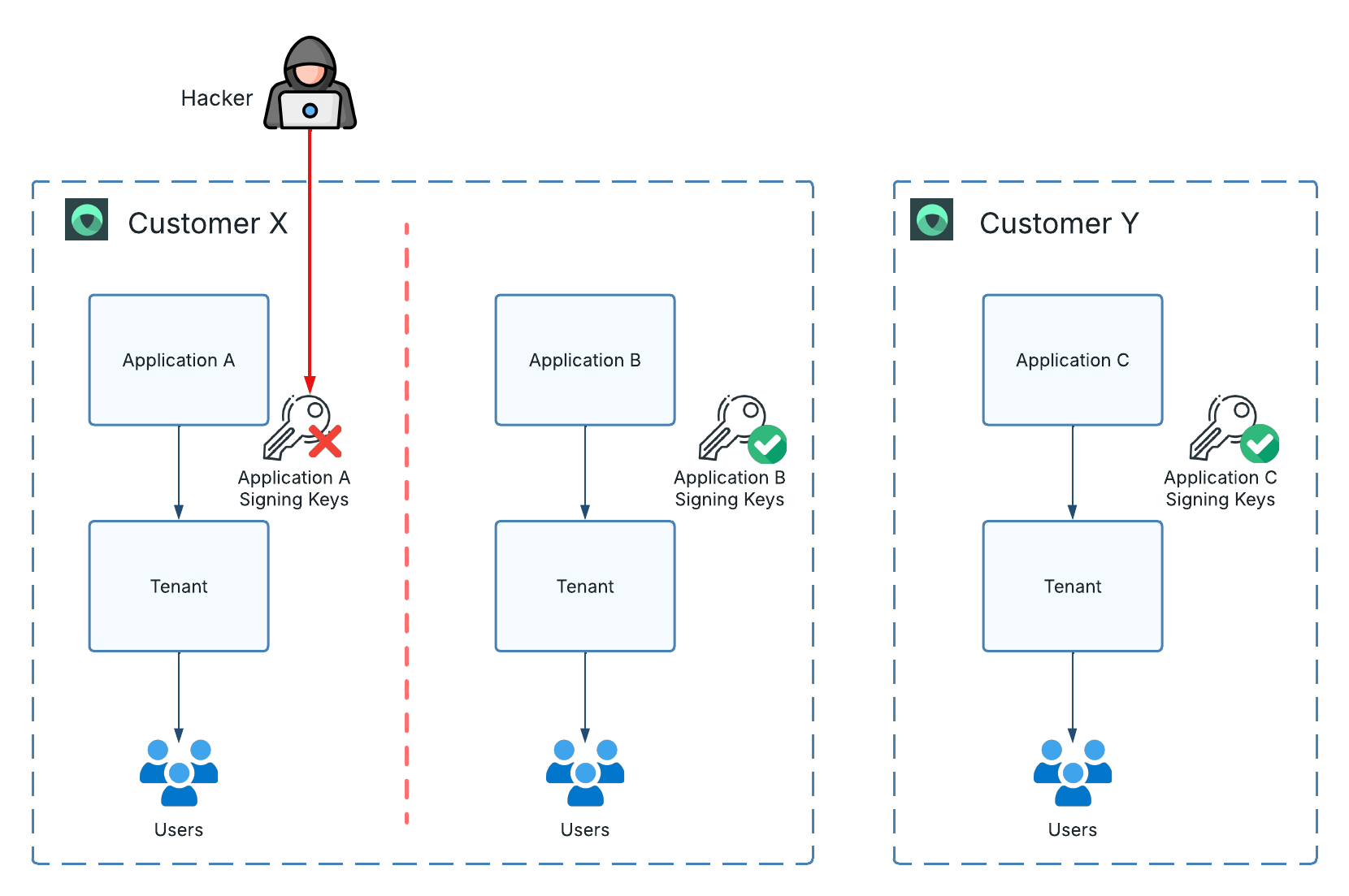
Figure 2: A signing-key compromise affects only tokens for the affected application; other applications remain isolated.
Verifying Access and ID Tokens
Before trusting a Wristband access token or ID token, your application must validate its signature and relevant claims. At a minimum, verify:
- Signature and algorithm: Verify the signature using the expected
RS256algorithm and the correct public signing key. iss(Issuer): Your application should perform a strict string comparison to ensure theissclaim value exactly matches one of the following:- Default Application Vanity Domain: If no application custom domain is active, the
issclaim will be set to the application's default vanity domain (e.g.,https://yourapp-yourorg.us.wristband.dev). - Application Custom Domain: If an application custom domain is active, the
issclaim will be set to the application's custom domain (e.g.,https://auth.yourapp.com).
- Default Application Vanity Domain: If no application custom domain is active, the
exp(Expiration): Reject expired tokens.aud(Audience): For ID tokens, confirm that the audience matches the ID of the OAuth2 client that sent the authorization request.
Verifying JWT Signatures
You can validate Wristband-issued tokens by using the Introspect Token API or verifying their signatures locally with Wristband's published signing keys.
Option 1: Token Introspection
Wristband provides an Introspect Token API that your backend can call to check whether a token is active and valid. A successful introspection response includes token status and associated claims.
Introspection requires a network request to Wristband. This can add latency and network overhead if performed for every API call.
Option 2: Local JWT Verification (Recommended)
For high-throughput APIs, verify token signatures locally using public keys from Wristband's JWKS Endpoint. Cache the keys and use the JWT's kid value to select the matching public key.
If you encounter an unfamiliar kid, refresh your JWKS cache to account for signing-key rotation. Apply a reasonable cache lifetime rather than assuming that keys fetched at startup will remain unchanged indefinitely.
Obtaining New Access Tokens
When an access token expires, the client must obtain a new one before using it for subsequent authenticated requests. The process depends on the subject type:
- Users: If the application has a valid refresh token, call the Token Endpoint with the
refresh_tokengrant type. Otherwise, the user will need to authenticate again. - OAuth2 clients: Call the Token Endpoint with the
client_credentialsgrant type and the client's credentials.
Signing Key Rotation
Signing-key rotation replaces the key used to sign new tokens. Regular rotation helps limit long-term exposure and supports recovery if a private key is compromised.
Each Wristband application can rotate its signing keys independently. To support rotation without interrupting valid sessions, signing keys can occupy one of three positions:
| Position | Description |
|---|---|
| Current | The key currently used to sign newly issued tokens. |
| Previous | The former current key. It no longer signs new tokens but may remain available to verify tokens issued before rotation. |
| Next | The key prepared to become current at the next rotation. Publishing it in advance allows applications to prefetch it. |
During rotation, applications should continue to accept valid tokens signed by keys in the Previous and Current position. Once a key is no longer returned from the JWKS endpoint it should be considered invalid and tokens signed with that key should be rejected.
Updated 19 days ago