
Role-Based Access Control (RBAC)
Learn how Wristband can help implement RBAC in your application.
Overview
Wristband provides a Role-Based Access Control (RBAC) entity model for defining roles, permissions, permission groups, and role assignments for users and OAuth2 clients.
Wristband manages this access-control data, but your application is responsible for enforcing authorization decisions for its own resources. Your application must evaluate an authenticated user's or client's role and permission assignments to determine whether they are authorized to perform a requested action.
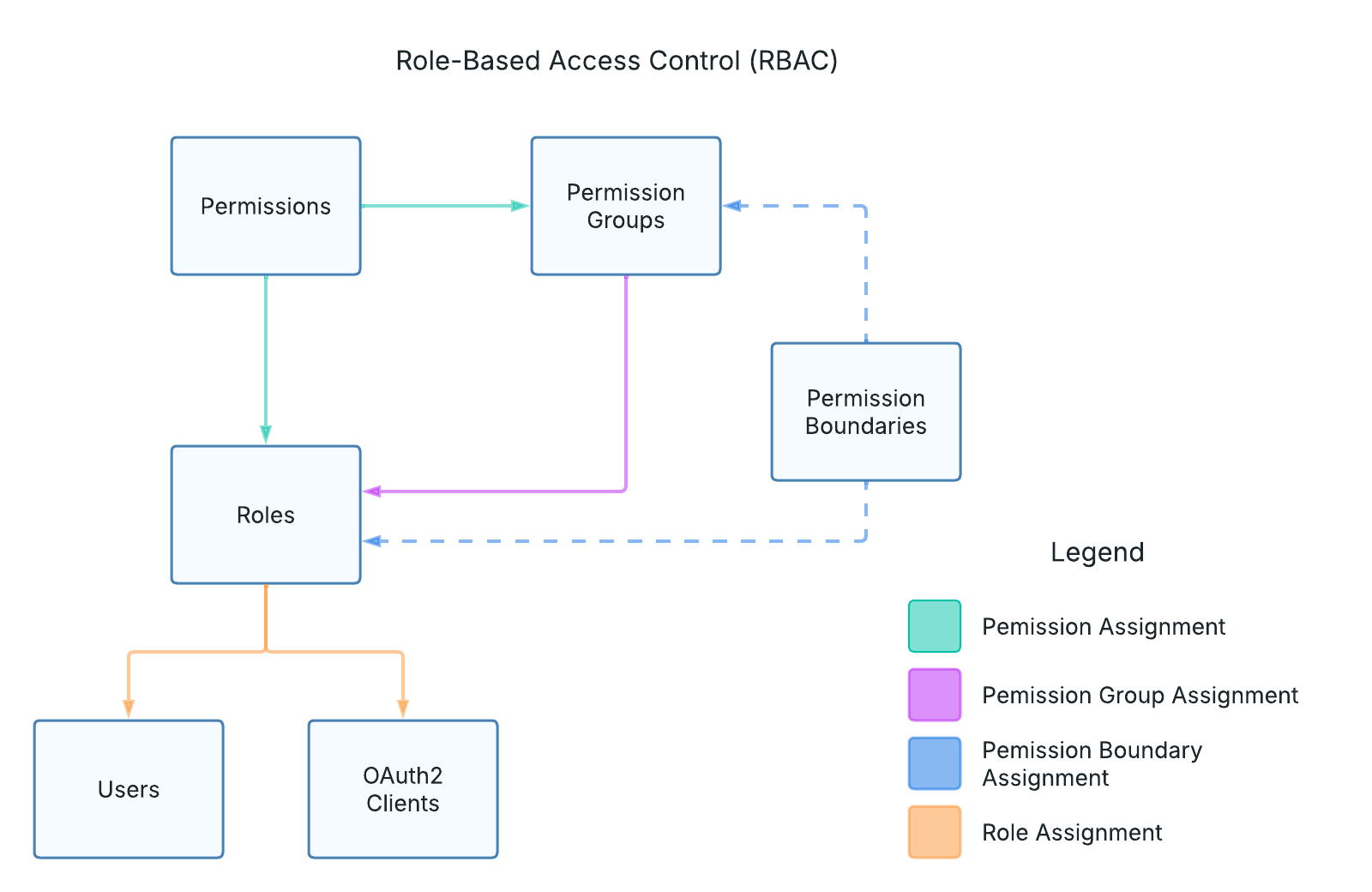
Figure 1: Wristband's RBAC entity model.
Authorization Strategies
Your application can enforce access control using either role-based authorization or permission-based authorization. The appropriate strategy depends on whether access should be determined by an entity's assigned roles or the permissions granted through those roles.
These strategies are not mutually exclusive. For example, your application might use roles to restrict access to administrative functionality while using permissions to control specific actions within that functionality.
Role-Based Authorization
Role-based authorization determines whether a user or client has the role or combination of roles required to access a resource or perform an action.
For example, your application might restrict access to an administrative dashboard to users assigned the admin role. When a user attempts to access the dashboard, your application checks their assigned roles to determine whether access should be granted.
With this approach, authorization decisions are based directly on role assignments without evaluating the individual permissions associated with those roles.
Permission-Based Authorization
Permission-based authorization determines whether a user or client has the specific permissions required to access a resource or perform an action. This approach provides more granular access control than checking roles alone.
In Wristband, permissions are assigned to roles rather than directly to users or clients. To perform permission-based authorization, your application must evaluate the permissions granted through the entity's assigned roles.
For example, your application might require the following permissions:
invoice:read: Required to view an invoice.invoice:write: Required to create or modify an invoice.
When a user or client attempts one of these actions, your application checks whether their assigned roles grant the required permission before allowing the operation.
Where to Enforce Authorization
Authorization checks are typically performed at two layers of your application: the frontend UI and the backend APIs.
UI Authorization
UI authorization controls which parts of your application's interface are visible or accessible to a user based on their assigned roles or permissions.
For example, your application might:
- Hide administrative navigation links from users who lack the required role.
- Disable buttons or actions that a user is not authorized to perform.
- Display informative messages when a user lacks permission to access certain functionality.
UI authorization helps provide a better user experience by preventing users from attempting actions they are not permitted to perform.
UI Authorization is not a Substitute for API AuthorizationUI authorization helps prevent users from attempting unauthorized actions, but it does not enforce security. Because users can bypass the UI and call backend APIs directly, authorization checks must always be enforced at the API layer to protect application resources.
API Authorization
API authorization enforces access control at the backend, ensuring that only authorized users and clients can access protected resources or perform restricted operations.
Because backend APIs can be called directly, bypassing the frontend UI, your application must enforce authorization at the API layer regardless of any UI-level authorization checks.
When processing a request, your API should verify that the authenticated user or client has the required roles or permissions before performing the requested action.
If the entity is authenticated but lacks the required authorization, the API should return an HTTP 403 Forbidden response.
Accessing Roles and Permissions
To enforce authorization, your application needs access to the roles or permissions assigned to an authenticated user or client.
Wristband provides several ways to retrieve this information, depending on whether your application uses role-based or permission-based authorization.
Retrieving Roles
For users authenticated through the OIDC Authorization Code Flow, you can request the roles scope during authorization. When this scope is included, Wristband returns a roles claim in the UserInfo Endpoint response.
Your application can extract the user's roles from the response and store them in its session for use during subsequent authorization checks.
Alternatively, your application can retrieve role assignments directly from Wristband using the following APIs:
- Users: Get Roles Assigned to a User API
- Clients: Get Roles Assigned to a Client API
Retrieving roles through these APIs allows your application to obtain the entity's current role assignments without relying on roles previously stored in a session.
Retrieving Permissions
Unlike roles, Wristband does not include permissions in the UserInfo Endpoint response. Instead, your application can retrieve permissions from Wristband when needed using the Get Permission Info for Authenticated Subject API.
This API allows your application to retrieve permission information for a user or client, which can then be evaluated during authorization checks.
Your application can also cache the retrieved permissions to avoid repeatedly calling Wristband for the same information.
Caching Roles and Permissions
When implementing authorization, you'll need to decide whether your application should retrieve roles and permissions from Wristband for each authorization check or cache them locally.
Both approaches have tradeoffs:
- Retrieve on demand: Fetch roles or permissions from Wristband when performing authorization checks. This provides access to the latest authorization data but introduces additional network requests and potential latency.
- Cache locally: Store roles or permissions in your application's session or another caching mechanism. This reduces network requests and improves performance but means authorization changes might not take effect until the cached data is refreshed.
The appropriate approach depends on your application's security and performance requirements.
For applications that require authorization changes to take effect immediately, retrieving the latest roles or permissions from Wristband is generally preferable. For applications where performance is a higher priority, caching authorization data with an appropriate expiration or invalidation strategy may be more suitable.
Updated about 1 hour ago