
Refreshing Access Tokens
Below are the steps for refreshing access tokens on the backend server.
Steps:
- The client-side application sends a request to any protected API on the backend server. The session cookie is automatically included in the request headers.
- Before reaching the business logic of the requested route, an authentication middleware processes the request. The middleware accesses the user's session data, which includes the access token, refresh token, and access token expiration time.
- The middleware checks if the access token has expired. If the access token has expired, the middleware makes a request to Wristband's Token Endpoint to obtain a new one. For the request to succeed, the refresh token from the user's session must be included in the request body.
- Wristband verifies the refresh token's validity. If valid, it generates a new access token and includes it in the response.
- After obtaining a valid access token, the middleware allows the protected API to proceed with its business logic. In addition, the session is updated to include the new access token and access token expiration time.
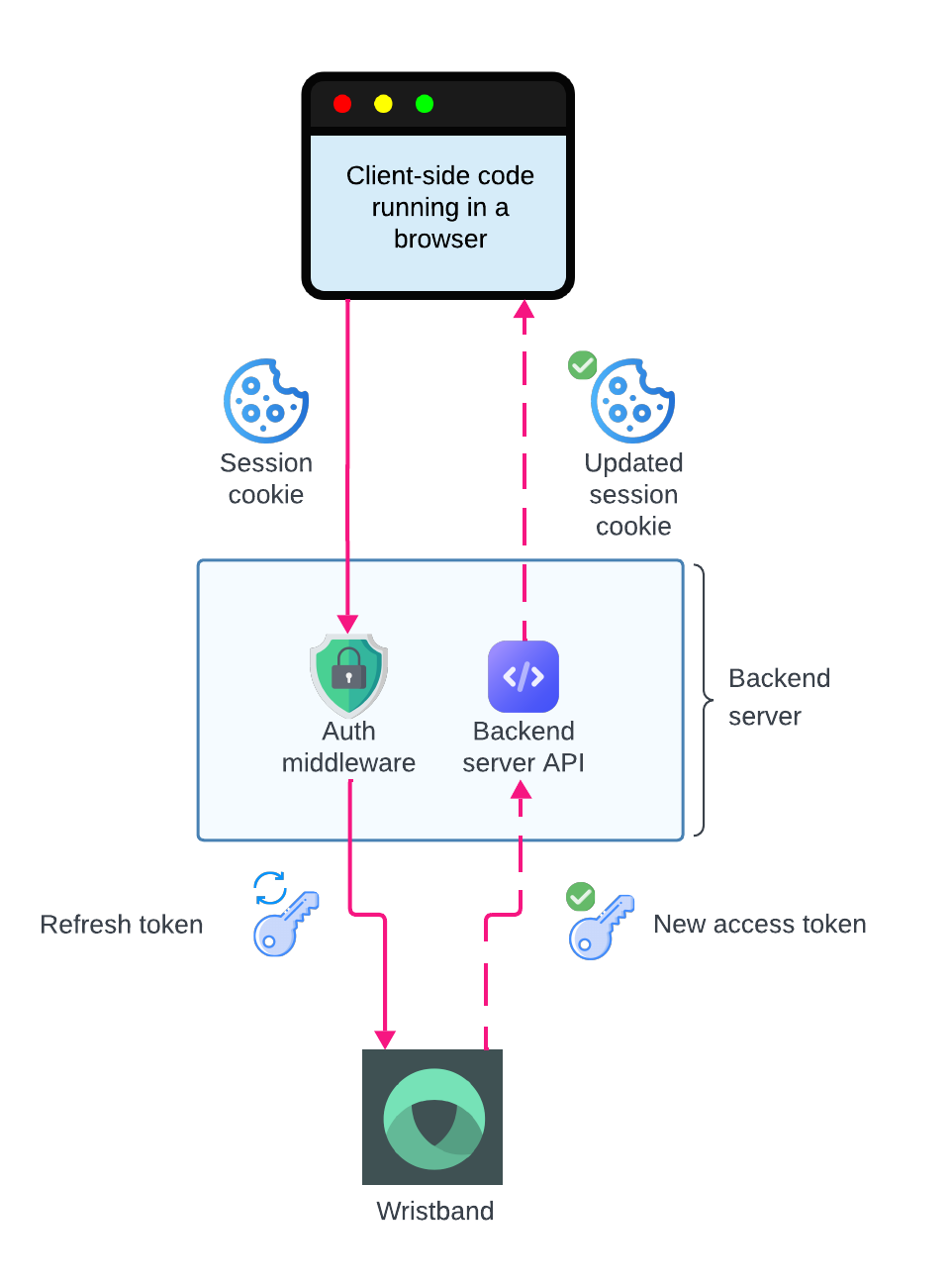
Refresh Token flow for a backend server integration
Handling Refresh Failures
The token refresh operation can fail for the following reasons:
- The refresh token has expired.
- The refresh token has been revoked.
- The refresh token has been tampered with and is no longer valid.
- Network issues or server errors (e.g.:
500 Internal Server Error).
Retrying Refresh RequestsFor
500errors, it is advised to retry the refresh request to minimize disruption for the end user. We recommend implementing retry logic with an exponential backoff.
Server-side Error Handling
If the call to Wristband's Token Endpoint fails and the error can't be recovered from using retries, then the backend server should perform the following actions.
- Invalidate the user's session by doing the following:
- Cookie-based sessions: Clear the session cookie and set it to expire immediately.
- Server-side sessions: Clear the session cookie and set it to expire immediately. In addition, remove the session data from the backend session store.
- Return an appropriate error response to the client. The error response should use a
401 Unauthorizedstatus code to indicate that the user is no longer authenticated.
Client-side Error Handling
When the client-side application receives a 401 response from the server, you can handle it in various ways based on your UX and security requirements:
- Redirect to Login Without Destroying the Wristband Auth Session: Send the user to the Wristband login page without calling the Wristband Logout Endpoint. If the user still has a valid Wristband Auth Session, they will automatically be re-authenticated without having to enter their credentials.
- Full Logout and Re-authentication: Clean up any local session data from the client-side application, then redirect the user to Wristband’s Logout Endpoint to terminate the Wristband Auth Session. This will force the user to re-authenticate the next time they try to access your application.
Updated about 3 hours ago
Did this page help you?