
OAuth2 Clients
Learn about Wristband OAuth2 client types, supported authentication flows, and configuration settings.
Overview
OAuth2 clients represent applications or services that use Wristband to authenticate users or machines. A single Wristband application can have multiple OAuth2 clients to accommodate different authentication requirements.
Client Types
Wristband supports three types of OAuth2 clients, each designed for different authentication scenarios. The following table compares their supported grant types, security classifications, and common use cases.
| Client Type | Classification | Supported Grant Types | Common Use Cases |
|---|---|---|---|
| Backend Server | Confidential | authorization_code, refresh_token, client_credentials | Server-side web applications |
| Native | Public | authorization_code, refresh_token | Mobile and desktop applications |
| Machine-to-Machine (M2M) | Confidential | client_credentials | Backend microservices, automated jobs, and server-to-server integrations |
OAuth2 Grant Types
OAuth2 grant types determine how a client obtains tokens from Wristband. Each client can only use the grant types supported by its client type and enabled in its configuration.
Wristband supports the following grant types:
- Authorization Code (
authorization_code): Allows a client to authenticate a user through Wristband's hosted login pages. After successful authentication, the client exchanges the authorization code for tokens using Wristband's Token Endpoint. This grant type is supported by Backend Server and Native clients. Native clients must use Proof Key for Code Exchange (PKCE) to secure the authentication flow. - Client Credentials (
client_credentials): Allows a client to authenticate as itself, without user involvement, and obtain an access token for making authorized API requests. This grant type is supported by M2M clients and can optionally be enabled for Backend Server clients. - Refresh Token (
refresh_token): Allows a client to obtain new access tokens without requiring the user to re-authenticate. This grant type is supported by Backend Server and Native clients. Refresh tokens are issued when theoffline_accessscope is included in the authorization request, and the client must have therefresh_tokengrant type enabled.
Public vs. Confidential Clients
OAuth2 clients are classified as either public or confidential based on their ability to securely store credentials.
- Public Clients: Cannot securely store a client secret. These clients use their client ID to identify themselves and must use Proof Key for Code Exchange (PKCE) to protect the Authorization Code flow.
- Confidential Clients: Can securely store a client secret. These clients authenticate with their client ID and secret when making requests to the Token Endpoint.
Protecting Client SecretsClient secrets must never be exposed in browser-based JavaScript, mobile applications, or other publicly accessible code. Only confidential clients running in trusted environments should store and use client secrets.
Backend Server Clients
Backend Server clients are designed for web applications that have a trusted backend capable of securely storing credentials.
These clients have a unique client ID and secret, which must be stored securely on the backend server. The backend is responsible for exchanging authorization codes, obtaining tokens, and securely managing client credentials.
Backend Server clients support the following grant types:
- Authorization Code (
authorization_code): Authenticates users through Wristband's hosted login pages. After successful authentication, the backend exchanges the authorization code for tokens. - Refresh Token (
refresh_token): Allows the backend server to obtain new access tokens using previously issued refresh tokens without requiring the user to re-authenticate. - Client Credentials (
client_credentials): Allows the backend server to authenticate itself without user involvement.
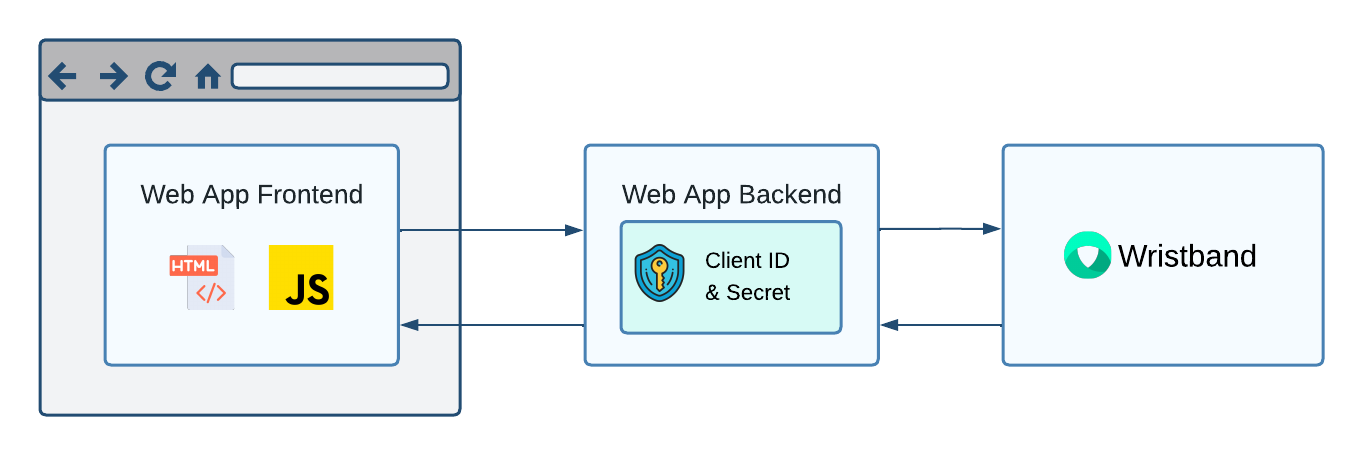
Figure 1: Backend Server clients securely store their client ID and secret on the backend server.
Native Clients
Native clients are designed for applications running directly on a user's device, such as mobile and desktop applications.
Because native applications cannot securely store client secrets, they are classified as public clients and only have a client ID.
Native clients authenticate users using the Authorization Code flow with PKCE. The application opens a browser and redirects the user to Wristband's Authorize Endpoint. After successful authentication, Wristband redirects the user back to the native application using a registered redirect URI.
Native clients also support the refresh_token grant type, allowing applications to obtain new access tokens without requiring users to repeat the authentication flow.
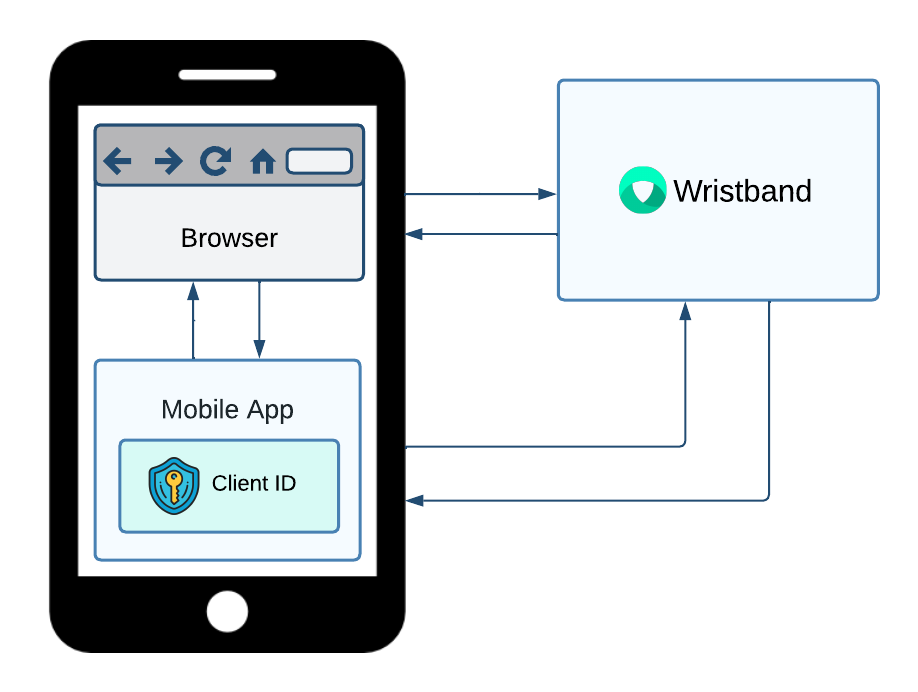
Figure 2: Native clients use a browser-based authentication flow with PKCE and do not require a client secret.
Native Client Redirect URI Features
Native clients support several redirect URI features specifically designed for mobile and desktop applications:
-
Custom URL Schemes: Register custom URI schemes, such as
myapp://callback, to allow the browser to redirect users back to the native application after authentication. -
Loopback Addresses: Register redirect URIs using loopback addresses, such as
localhostor127.0.0.1, for applications that receive authentication responses through a local HTTP server. -
Dynamic Ports: Support dynamically assigned ports for loopback redirect URIs. To enable this behavior, register the redirect URI without a port number. When calling Wristband's Authorize Endpoint, specify the actual port in the
redirect_uriquery parameter.For example, you can register the following redirect URI without a port:
http://127.0.0.1/callbackWhen initiating an authorization request, your native application can specify a dynamically assigned port, such as:
http://127.0.0.1:54321/callbackWristband accepts the redirect URI as long as the scheme, hostname, and path match the registered URI, allowing the application to receive the authorization response on the specified port.
Machine-to-Machine (M2M) Clients
Machine-to-Machine (M2M) clients are designed to authenticate software processes that operate without user involvement.
Common use cases include backend microservices, scheduled jobs, and server-to-server API integrations.
M2M clients are confidential clients that use a client ID and secret to authenticate directly with Wristband's Token Endpoint using the client_credentials grant type.
Once authenticated, the client receives an access token that can be used to make authorized API requests.
Unlike Backend Server and Native clients, M2M clients do not support the authorization_code or refresh_token grant types because they authenticate as themselves rather than on behalf of users.
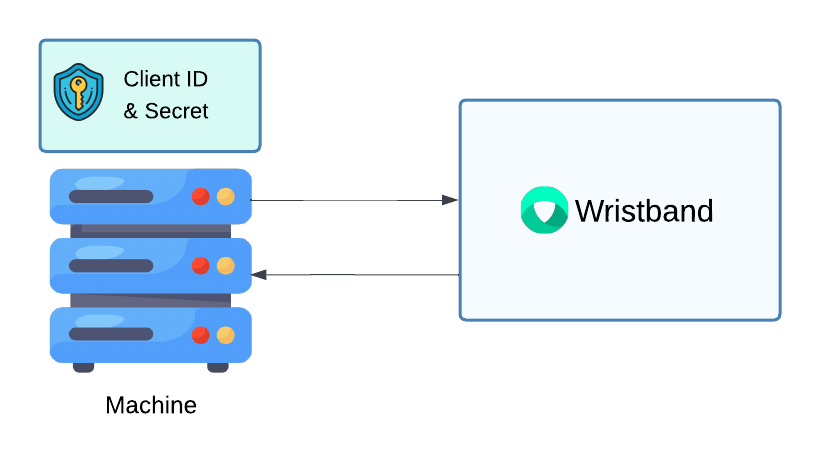
Figure 3: M2M clients authenticate directly with Wristband using their client ID and secret.
Managing Client Secrets
Confidential clients, including Backend Server and M2M clients, use client secrets to authenticate with Wristband.
For security, Wristband stores only a hashed version of each client secret. As a result, plaintext secrets cannot be retrieved after they are generated.
Keep the following considerations in mind:
- One-Time Visibility: Client secrets are displayed only when they are initially generated.
- Secure Storage: Copy and store client secrets in a secure location, such as a secrets manager.
- Secret Recovery: If a client secret is lost, you must rotate it to generate a new one.
Rotating a Client Secret
Wristband supports client secret rotation to allow credentials to be updated without interrupting authentication.
When a client secret is rotated:
- Wristband generates a new primary client secret.
- The existing primary secret becomes the secondary client secret.
- Both the primary and secondary secrets remain valid, allowing applications to transition to the new secret without downtime.
Existing Secondary SecretsA client can have only one primary and one secondary secret. If a secondary secret already exists when you rotate the primary secret, the existing secondary secret is permanently invalidated and replaced by the previous primary secret.
Ensure the existing secondary secret is no longer in use before performing another rotation.
Deleting a Secondary Client Secret
After all services using the client have been updated to use the new primary secret, you can delete the secondary secret.
Deleting the secondary secret immediately invalidates it, preventing it from being used for future authentication requests.
Configuring JWT Settings
Wristband allows you to configure token expiration settings for individual OAuth2 clients. These settings determine how long access tokens, ID tokens, and refresh tokens remain valid.
The following table describes the available settings, their expiration limits, and the client types that support them.
| Setting | Description | Supported Client Types | Default Expiration | Maximum Expiration |
|---|---|---|---|---|
| Access Token Expiration | How long access tokens remain valid. | Backend Server, Native, M2M | 30 minutes (Backend Server, Native); 24 hours (M2M) | 24 hours |
| ID Token Expiration | How long ID tokens remain valid. | Backend Server, Native | 30 minutes | 24 hours |
| Refresh Token Idle Expiration | Maximum period a refresh token can remain unused before expiring. | Backend Server, Native | 24 hours | 90 days |
| Refresh Token Absolute Expiration | Maximum lifetime of a refresh token, regardless of usage. | Backend Server, Native | 24 hours | 365 days |
Minimum Token ExpirationAll JWT expiration settings have a minimum configurable duration of 5 minutes.
Refresh Token Rotation
Refresh token rotation is a security mechanism that issues a new refresh token each time an existing refresh token is used to obtain a new access token. The previously used refresh token is invalidated after a short reuse interval, preventing it from being reused indefinitely.
When refresh token rotation is enabled, the following process occurs:
- The client sends its current refresh token to Wristband's Token Endpoint using the
refresh_tokengrant type. - Wristband validates the refresh token and issues a new access token and refresh token.
- The previously used refresh token remains valid for a 30-second reuse interval, after which it is invalidated.
- The client must securely store the new refresh token and use it for subsequent token refresh requests.
This process helps protect against refresh token replay attacks. If a previously used refresh token is submitted after the reuse interval has expired, Wristband treats it as a potential replay attack and invalidates all refresh tokens associated with the same rotation chain.
Wristband supports the following rotation settings for Backend Server and Native clients:
- Enabled: A new refresh token is issued with every successful refresh request, and the previously used refresh token is invalidated after the 30-second reuse interval.
- Disabled: The existing refresh token can be reused to obtain new access tokens until it expires or is revoked.
By default, refresh token rotation is disabled for both Backend Server and Native clients.
Recommended Client Types for Refresh Token RotationWristband recommends enabling refresh token rotation only for public clients, such as Native clients, which cannot securely store client secrets.
Refresh token rotation is generally not recommended for confidential clients, such as Backend Server clients.
Refresh Token Reuse IntervalWristband provides a 30-second refresh token reuse interval when refresh token rotation is enabled. During this interval, a previously used refresh token can be reused to obtain new tokens.
This interval helps accommodate temporary failures, such as network interruptions or lost token responses, where a client may need to retry a refresh request using the same refresh token.
Once the 30-second interval expires, the previously used refresh token is no longer valid. If the token is used again, Wristband treats it as a potential replay attack and invalidates all refresh tokens in the same rotation chain, including the latest refresh token.
Refresh Token Expiration and RotationRefresh token rotation does not eliminate the configured expiration limits. Refresh tokens remain subject to both the Refresh Token Idle Expiration and Refresh Token Absolute Expiration settings.
Successful refresh requests reset the idle expiration period, but the absolute expiration limit remains in effect regardless of how frequently tokens are refreshed.
Preventing Concurrent Refresh RequestsWhen refresh token rotation is enabled, your application should avoid making concurrent requests to Wristband's Token Endpoint using the
refresh_tokengrant type for the same user session.Concurrent refresh requests can create race conditions where responses arrive out of order, potentially causing an older refresh token to overwrite a newer one in storage. If the application subsequently uses the outdated refresh token after the 30-second reuse interval, Wristband will invalidate all refresh tokens in the rotation chain, preventing the application from obtaining new access tokens without re-authentication.
To prevent these issues, ensure that only one refresh request is in progress per user session at a time. Additional requests should wait for the existing refresh operation to complete and use the newly issued tokens.
Configuring Login Session Duration
When a user initiates authentication through Wristband's Authorize Endpoint, Wristband generates an authorization request JWT to track the authentication flow.
The Login Session Duration setting controls how long the user has to complete authentication before the authorization request expires. When enabled, Wristband uses the configured duration to set the exp (expiration time) claim in the authorization request JWT.
Backend Server and Native clients support the following settings:
- Restrict Time to Complete Login: Determines whether a time limit is enforced for completing authentication. By default, this setting is disabled. When disabled, the authorization request JWT does not contain an
expclaim and does not expire. - Login Session Duration: Specifies the maximum time allowed to complete authentication when the time restriction is enabled. Wristband calculates the JWT's
expclaim by adding the configured duration to the token's issuance time.
If the authorization request JWT expires before authentication is completed, Wristband's hosted pages require the user to restart the login flow.
Assigning Roles to Clients
OAuth2 clients can be assigned roles to control which operations they are authorized to perform when authenticating using the client_credentials grant type.
Unlike user-based authentication flows, where a client authenticates on behalf of a user, the client_credentials grant allows a client to authenticate as itself, without any user involvement. The resulting access token represents the client rather than an individual user.
By assigning roles to OAuth2 clients, you can define which permissions they have and enforce authorization decisions when they access protected resources. This applies to both M2M clients and Backend Server clients that have the client_credentials grant type enabled.
Authorization for Wristband API RequestsWhen calling Wristband APIs using an access token obtained through the
client_credentialsgrant, the authenticated client must have the permissions required by the API. These permissions are granted through the roles assigned to the client.If the client does not have the required permissions, Wristband rejects the request with a
403 Forbiddenresponse.
Updated about 12 hours ago