
MFA: Wristband-Hosted UI
By default, Wristband hosts the UI pages for both the MFA Enrollment and Challenge flows.
MFA Enrollment
The MFA enrollment flow varies depending on whether recovery codes are enabled in your MFA policy.
Recovery Codes Disabled
Regardless of which flow triggered enrollment, the sequence is as follows at a high level:
- The prior flow calls the relevant Wristband Authenticate API (depending on the primary auth factor used).
- The user is redirected to the Wristband-hosted MFA Enrollment Page, along with an MFA token in the query params. If the user has not yet enrolled a TOTP factor, Wristband calls the Enroll TOTP Auth Factor API to generate the QR code and secret key before rendering the page.
- The user scans the QR code with their authenticator app and enters the one-time code. Wristband calls the Verify TOTP Auth Factor Challenge API.
- Wristband calls the Verify MFA Enrollment API, passing along the MFA token.
- Wristband redirects the user to the Create Auth Session for MFA Enrollment API, which creates a Wristband Authentication Session for the user.
- The user then gets redirected to the appropriate location based on what triggered the MFA enrollment flow. The redirect URL resolves in the following order:
- If an OAuth 2 authorization request triggered the MFA enrollment flow, the redirect URI specified in the request is returned.
- If the MFA enrollment flow was triggered by a workflow with a custom redirect URL configured, the custom redirect URL is returned.
- If a client ID was passed to the request that triggers the MFA enrollment flow and a client login URL is defined, the client's login URL is returned.
- Otherwise, the application login URL is returned.
Because Wristband already created an Authentication Session for the user during MFA enrollment, the user gains immediate entry into the application without having to re-enter their credentials.
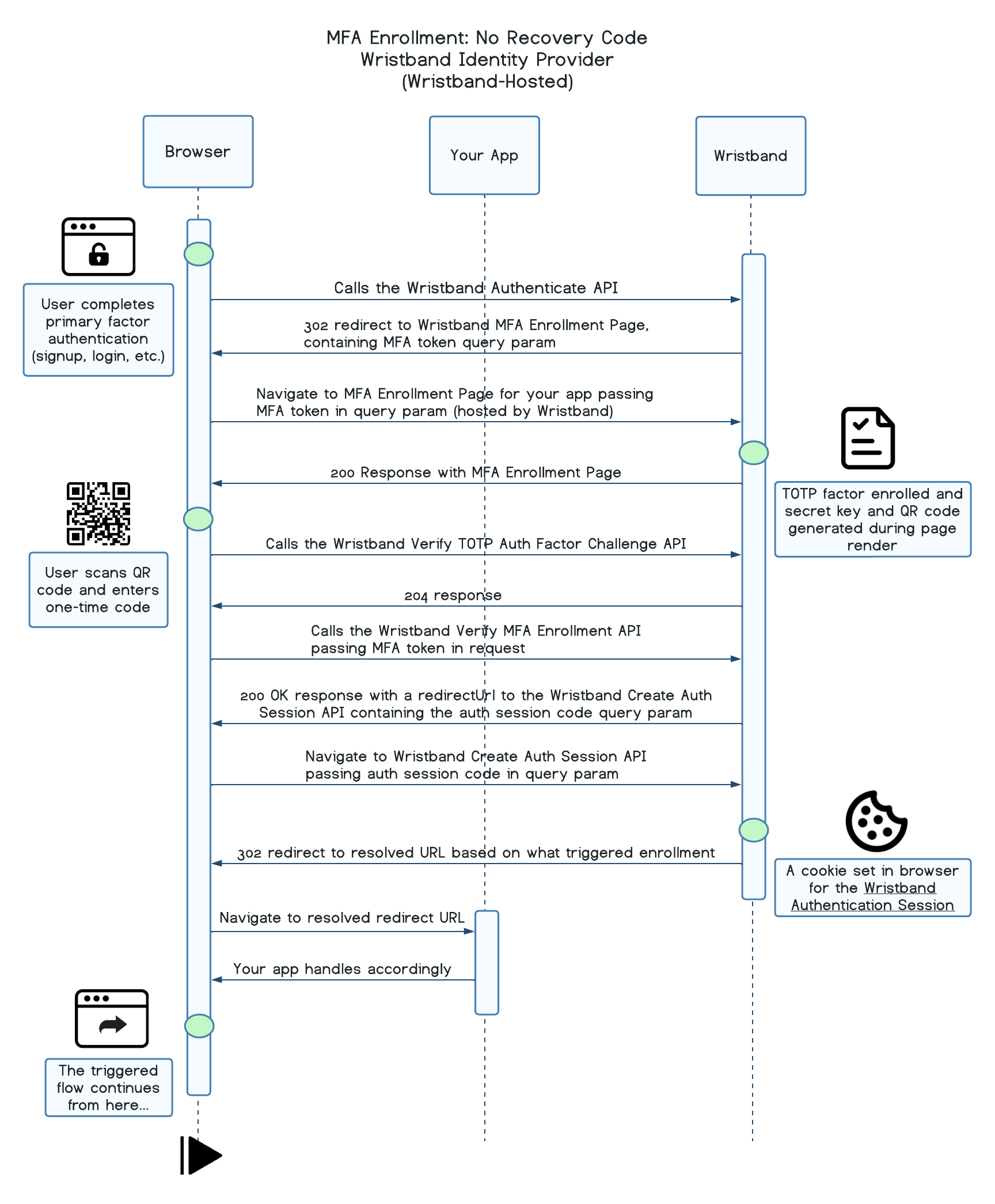
MFA Enrollment: No Recovery Code (Wristband-Hosted)
Recovery Codes Enabled
Regardless of which flow triggered enrollment, the sequence is as follows at a high level:
-
The prior flow calls the relevant Wristband Authenticate API (depending on the primary auth factor used).
-
The user is redirected to the Wristband-hosted MFA Enrollment Page. If the user has not yet enrolled a TOTP factor, Wristband calls the Enroll TOTP Auth Factor API to generate the QR code and secret key before rendering the page. If the user does not yet have a recovery code, one is also generated at this time.
-
The user scans the QR code with their authenticator app and enters the one-time code. Wristband calls the Verify TOTP Auth Factor Challenge API.
-
The user is shown their recovery code and prompted to save it before continuing.
-
Wristband calls the Verify MFA Enrollment API, passing along the MFA token.
-
Wristband redirects the user to the Create Auth Session for MFA Enrollment API, which creates a Wristband Authentication Session for the user.
-
The user then gets redirected to the appropriate location based on what triggered the MFA enrollment flow. The redirect URL resolves in the following order:
- If an OAuth 2 authorization request triggered the MFA enrollment flow, the redirect URI specified in the request is returned.
- If the MFA enrollment flow was triggered by a workflow with a custom redirect URL configured, the custom redirect URL is returned.
- If a client ID was passed to the request that triggers the MFA enrollment flow and a client login URL is defined, the client's login URL is returned.
- Otherwise, the application login URL is returned.
Because Wristband already created an Authentication Session for the user during MFA enrollment, the user gains immediate entry into the application without having to re-enter their credentials.
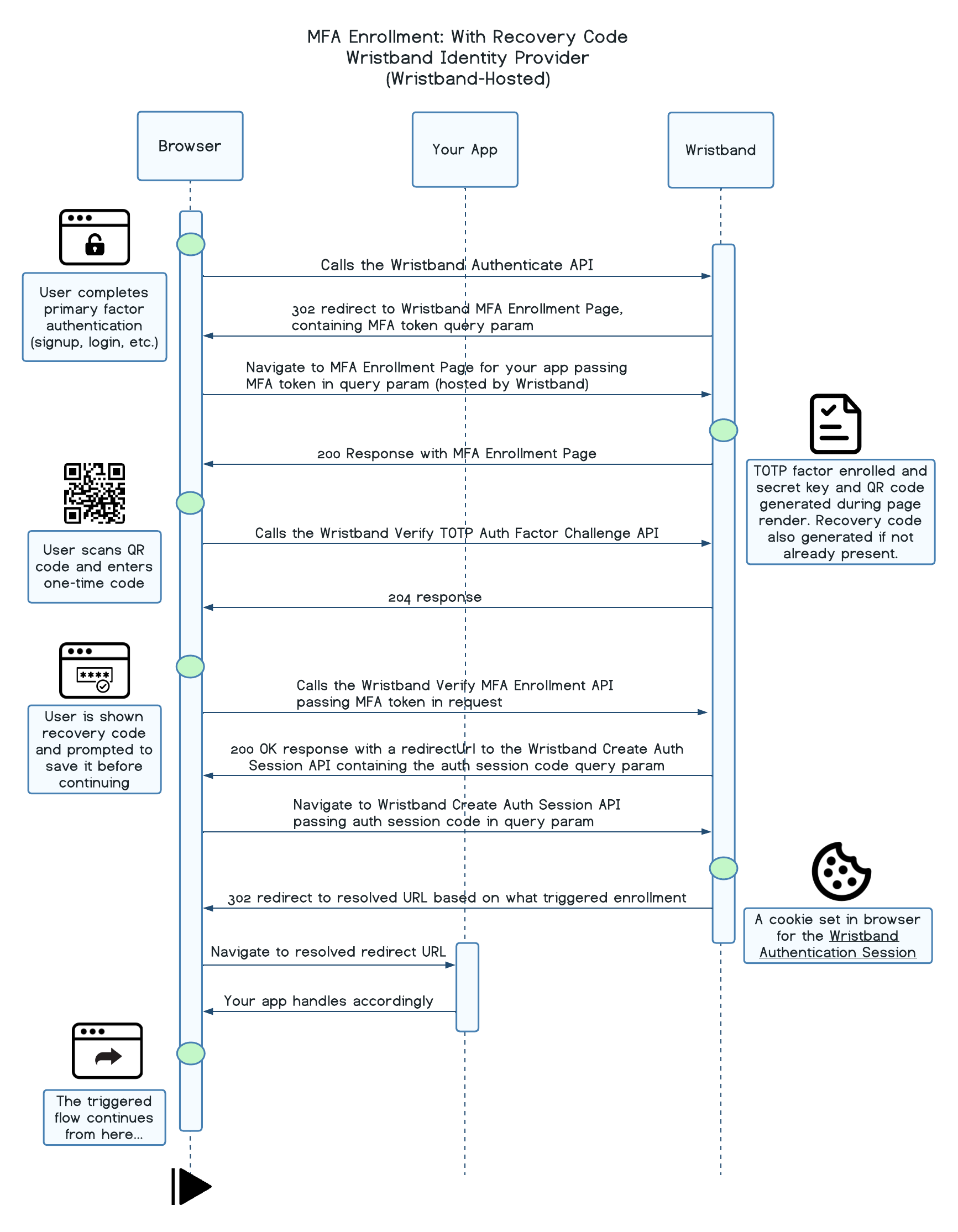
MFA Enrollment: With Recovery Code (Wristband-Hosted)
MFA Challenge
When a user who has already enrolled in MFA successfully authenticates with their primary login factor, Wristband redirects them to the tenant-level MFA challenge page at /mfa/challenge.
Using TOTP
Regardless of which flow triggered the challenge, the sequence is as follows at a high level:
- The prior flow calls the relevant Wristband Authenticate API (depending on the primary auth factor used).
- The user is redirected to the Wristband-hosted MFA Challenge Page, along with an MFA token in the query params.
- The user enters the one-time code generated by their authenticator app. Wristband calls the Verify MFA Challenge API, passing
TOTPas theauthFactorType, which returns aredirectUrlupon success. - Wristband redirects the user to the Create Auth Session for MFA Challenge API using the
redirectUrlfrom the previous step, which creates a Wristband Authentication Session for the user. - The user then gets redirected to the appropriate location based on what triggered the MFA challenge flow. The redirect URL resolves in the following order:
- If an OAuth 2 authorization request triggered the MFA challenge flow, the redirect URI specified in the request is returned.
- If the MFA challenge flow was triggered by a workflow with a custom redirect URL configured, the custom redirect URL is returned.
- If a client ID was passed to the request that triggers the MFA challenge flow and a client login URL is defined, the client's login URL is returned.
- Otherwise, the application login URL is returned.
Because Wristband already created an Authentication Session for the user during MFA challenge, the user gains immediate entry into the application without having to re-enter their credentials.
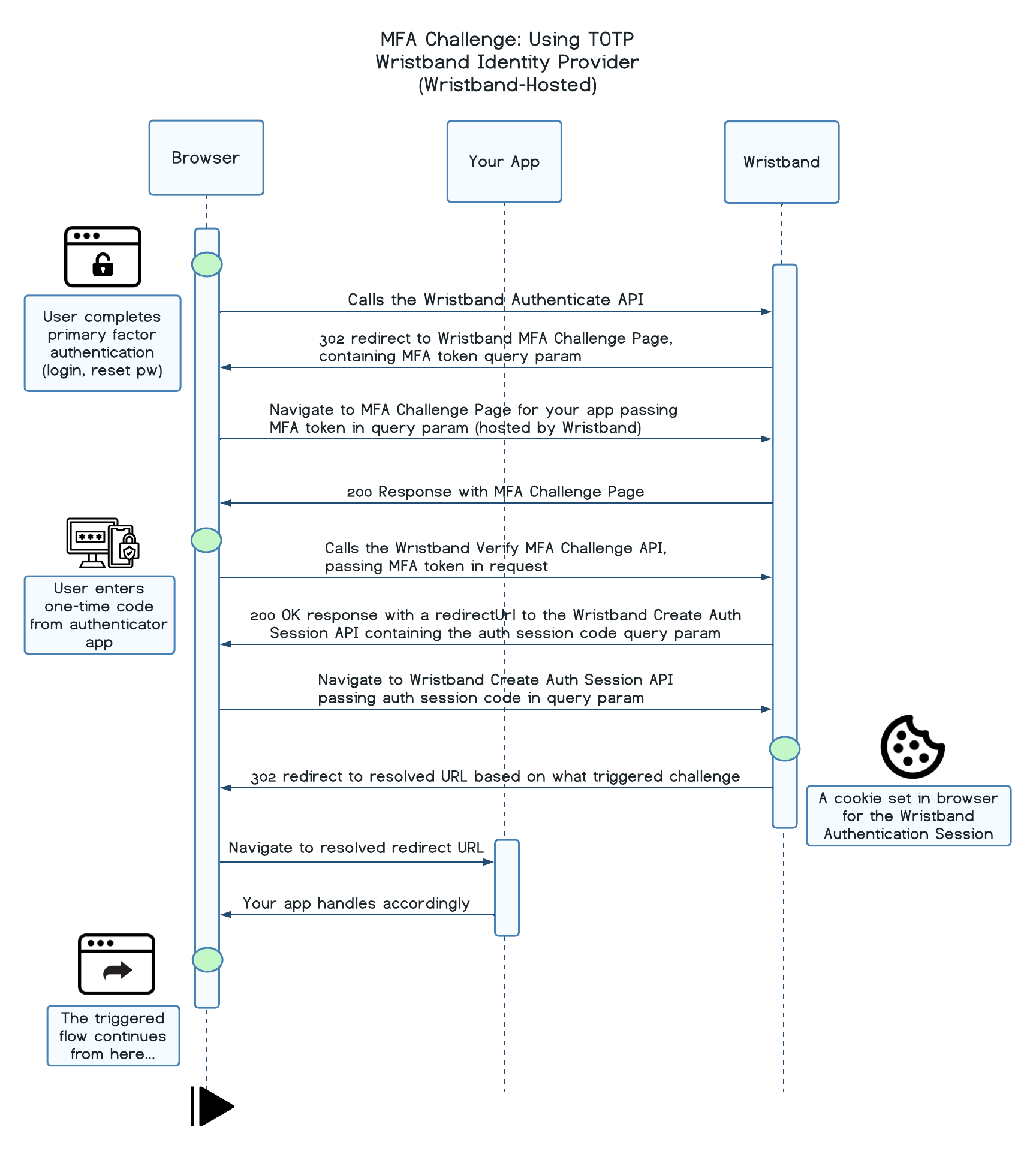
MFA Challenge: Using TOTP (Wristband-Hosted)
Using Recovery Code
Regardless of which flow triggered the challenge, the sequence is as follows at a high level:
- The prior flow calls the relevant Wristband Authenticate API (depending on the primary auth factor used).
- The user is redirected to the Wristband-hosted MFA Challenge Page, along with an MFA token in the query params.
- The user enters their saved recovery code. Wristband calls the Verify MFA Challenge API, passing
RECOVERY_CODEas theauthFactorType, which returns aredirectUrlupon success. The old code is invalidated and a newly generated recovery code is returned in the same response. - The user is shown their new recovery code and prompted to save it before continuing.
- Upon continuing, Wristband redirects the user to the Create Auth Session for MFA Challenge API using the
redirectUrlfrom previous steps, which creates a Wristband Authentication Session for the user. - The user then gets redirected to the appropriate location based on what triggered the MFA challenge flow. The redirect URL resolves in the following order:
- If an OAuth 2 authorization request triggered the MFA challenge flow, the redirect URI specified in the request is returned.
- If the MFA challenge flow was triggered by a workflow with a custom redirect URL configured, the custom redirect URL is returned.
- If a client ID was passed to the request that triggers the MFA challenge flow and a client login URL is defined, the client's login URL is returned.
- Otherwise, the application login URL is returned.
Because Wristband already created an Authentication Session for the user during MFA challenge, the user gains immediate entry into the application without having to re-enter their credentials.
Because Wristband already created an Authentication Session for the user during MFA challenge, the user gains immediate entry into the application without having to re-enter their credentials.
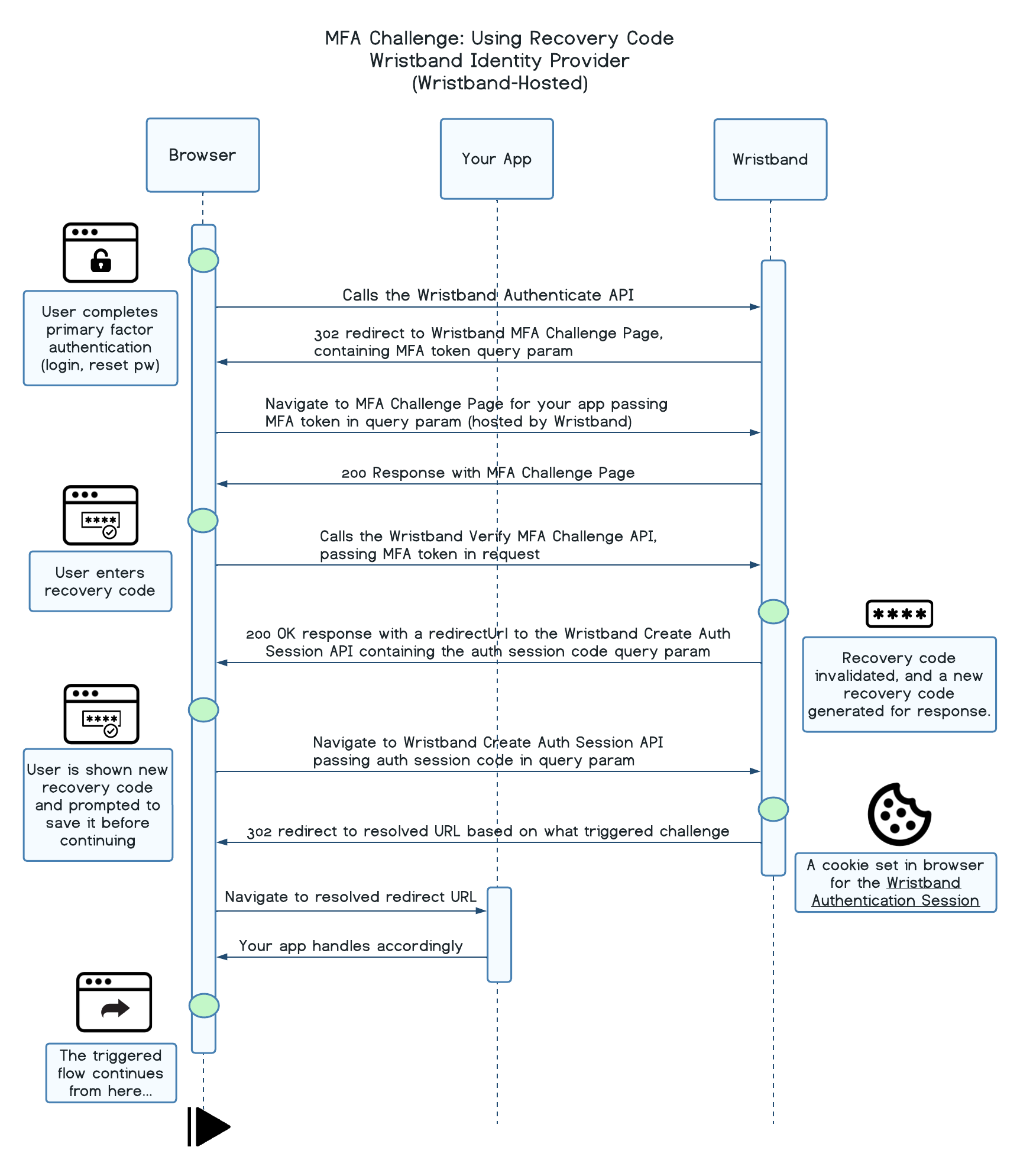
MFA Challenge: Using Recovery Code (Wristband-Hosted)
Updated 6 months ago