
Authentication Flows
A high-level overview of how authentication flows work for a backend server integration.
Overview
This guide explains how user login and logout flows work when integrating Wristband with a backend server. In this integration pattern, your backend server handles authentication requests, manages user sessions, and securely stores authentication tokens.
Login Flow
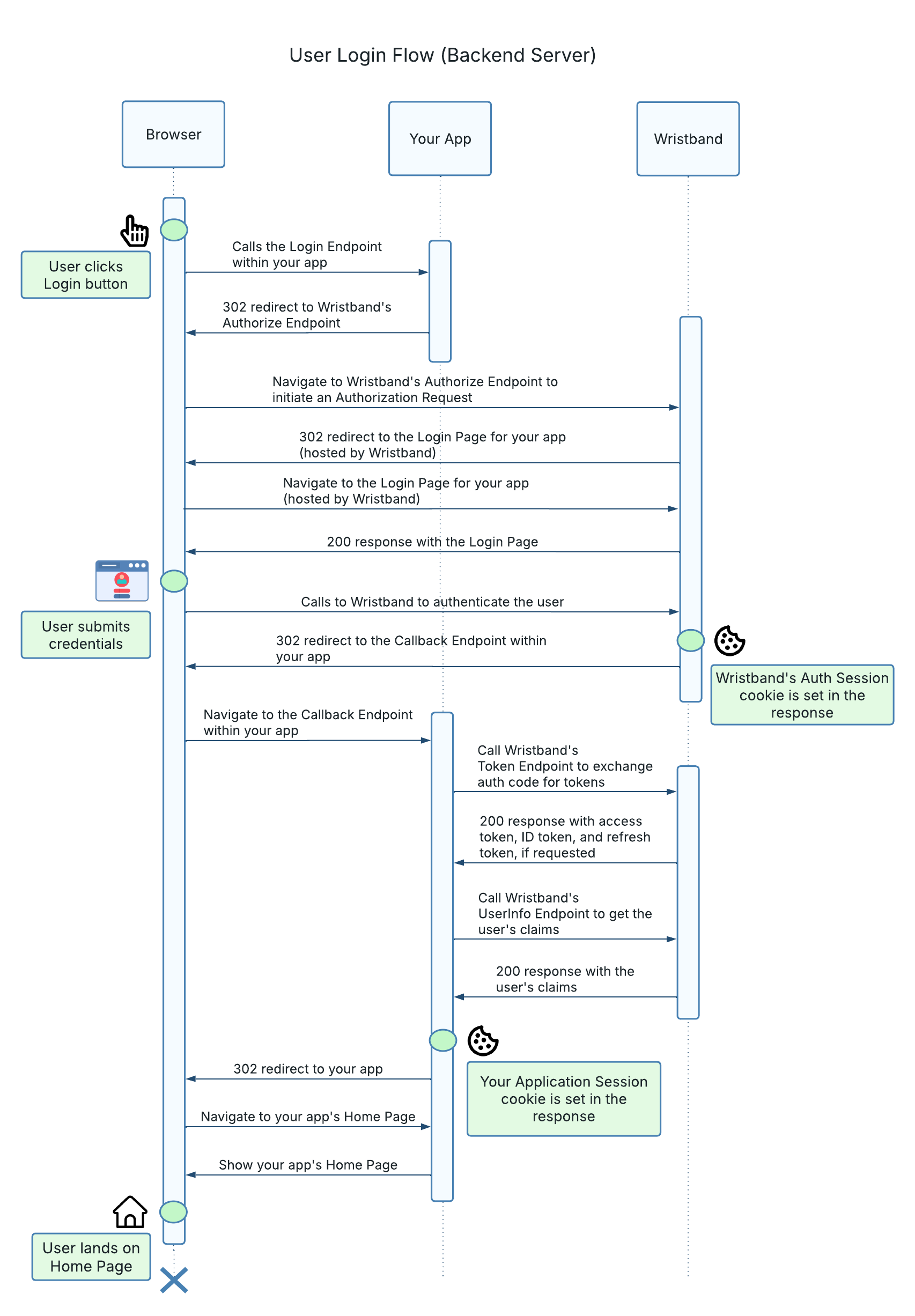
The login flow uses the OpenID Connect (OIDC) Authorization Code Flow with PKCE to authenticate users through Wristband. Your backend server initiates the authentication request, exchanges the resulting authorization code for tokens, and establishes an application session.
The following steps describe the login process:
-
User Initiates Login: The user clicks the Login button in your application, causing the browser to navigate to your backend server's Login Endpoint.
-
Backend Initiates Authentication: The Login Endpoint constructs an OIDC authorization request and redirects the browser to Wristband's Authorize Endpoint. The request includes the necessary parameters, such as the client ID, redirect URI, requested scopes, and PKCE code challenge.
-
Wristband Processes the Authorization Request: Wristband validates the request and directs the user to the appropriate tenant's hosted login page. If the user already has a valid Wristband authentication session, Wristband may automatically authenticate them without displaying the login page.
-
User Authenticates: The user completes authentication through the Wristband-hosted login page. Upon successful authentication, Wristband establishes an authentication session associated with the tenant's vanity domain.
-
Wristband Redirects to the Callback Endpoint: Wristband redirects the browser to your application's Callback Endpoint, including an authorization code in the redirect URL.
-
Backend Exchanges the Authorization Code: The Callback Endpoint calls Wristband's Token Endpoint to exchange the authorization code for tokens. The response includes an access token and an ID token. If the original authorization request included the
offline_accessscope, a refresh token is also returned. -
Backend Retrieves User Information: The Callback Endpoint calls Wristband's UserInfo Endpoint using the access token to retrieve claims about the authenticated user. The claims returned depend on the scopes requested in the authorization request.
-
Backend Creates the Application Session: The Callback Endpoint establishes an application session containing the information needed to maintain the user's authenticated state, such as their identity, tenant information, access token, refresh token (if issued), and token expiration time. The backend sets a session cookie in the browser to maintain the session across subsequent requests.
-
User Returns to the Application: The backend redirects the browser to your application's home page or the originally requested URL. The user is now authenticated and can access protected resources within your application.
Application Session vs. Wristband Authentication Session
Although both sessions are established during login, they operate independently. The Wristband authentication session enables automatic reauthentication with Wristband, while the application session maintains the user's authenticated state within your application.
Your backend server can use the access token stored in the application session to make authenticated API requests on behalf of the user. If the access token expires, the backend can use the refresh token, when available, to obtain a new access token without requiring the user to log in again.
Logout Flow
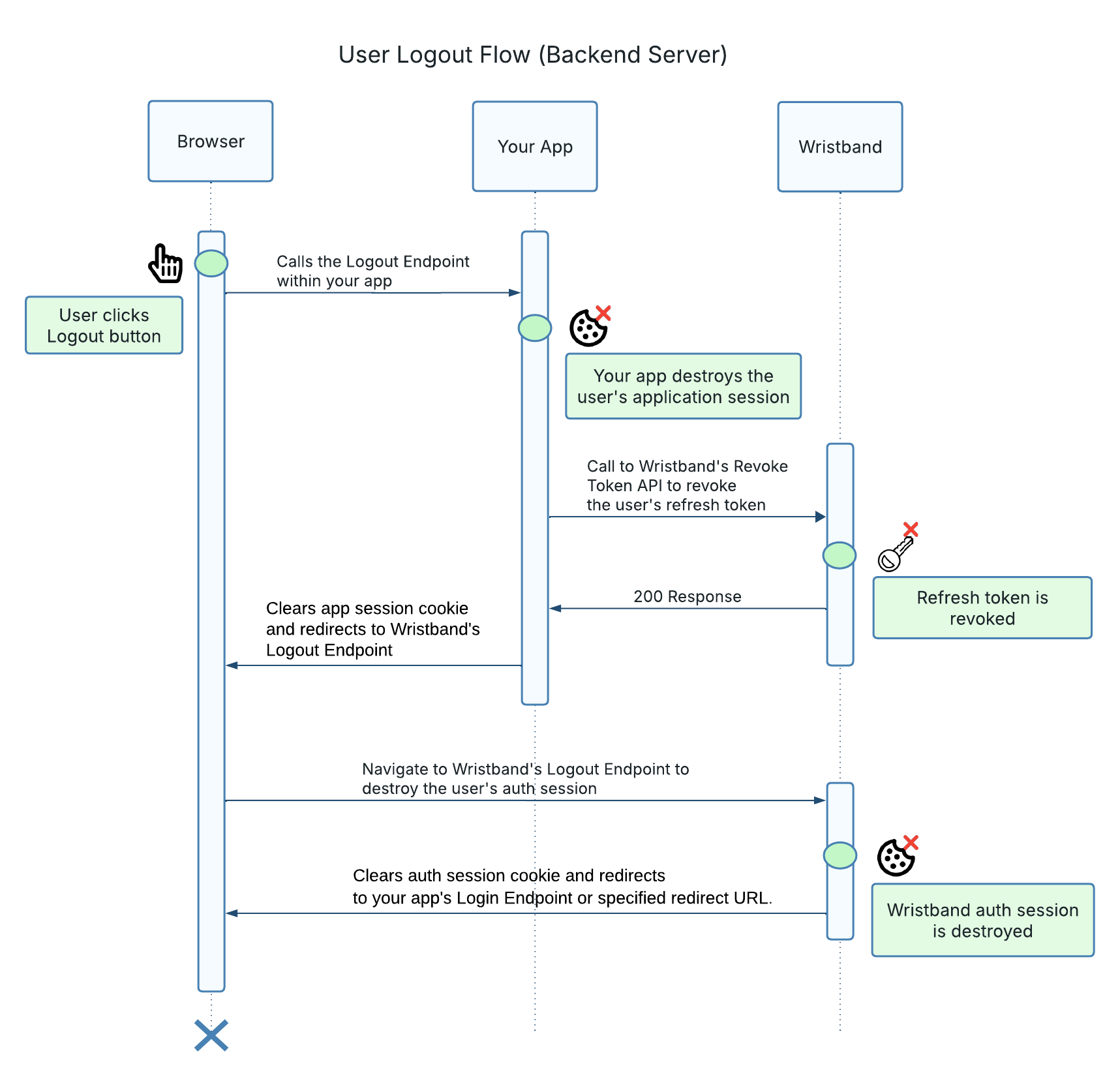
When a user logs out, your application must terminate both the application session and the Wristband authentication session. If a refresh token was issued during login, it should also be revoked to prevent further token refreshes.
The following steps describe the logout process:
-
User Initiates Logout: The user clicks the Logout button in your application, causing the browser to navigate to your backend server's Logout Endpoint.
-
Backend Destroys the Application Session: The Logout Endpoint invalidates the user's application session by clearing the session cookie and deleting any associated server-side session data. This prevents the session from being used to access protected resources within your application.
-
Backend Revokes the Refresh Token: If the user's session contains a refresh token, the backend calls Wristband's Revoke Token Endpoint to revoke it. This prevents the refresh token from being used to obtain new access tokens.
-
Backend Redirects to Wristband: The Logout Endpoint redirects the browser to Wristband's Logout Endpoint using the tenant's vanity domain. This ensures that the browser includes the appropriate Wristband authentication session cookie in the request.
-
Wristband Terminates the Authentication Session: Wristband invalidates the user's authentication session and clears the associated session cookie. This prevents Wristband from automatically reauthenticating the user using the terminated session.
-
User Returns to the Application: Wristband redirects the browser to your application's Login Endpoint or another configured redirect URL, completing the logout flow.
Why Both Sessions Must Be Terminated
Destroying your application's session does not automatically terminate the user's Wristband authentication session.
If the Wristband authentication session remains valid, the user may be automatically reauthenticated the next time they initiate login, without needing to enter their credentials.
To perform a complete logout, your application must clear its own session, revoke the refresh token if one was issued, and redirect the browser to Wristband's Logout Endpoint to terminate the Wristband authentication session.
Updated about 2 hours ago