
Refreshing Access Tokens
Learn how to refresh access tokens in native applications to maintain authenticated API access without requiring users to reauthenticate.
Overview
Access tokens have limited lifetimes and must be refreshed when they expire. Native applications are responsible for managing token expiration and obtaining new access tokens to maintain authenticated API access.
When an access token expires, your application can use a refresh token to request a new access token from Wristband's Token Endpoint without requiring the user to log in again.
Refresh tokens are issued when the offline_access scope is included in the original authorization request. If no refresh token is available, your application must initiate a new authentication flow when the access token expires.
Token Refresh Strategies
Native applications can use different strategies to determine when access tokens should be refreshed.
| Approach | How It Works | Advantages | Considerations |
|---|---|---|---|
| On-Demand Refreshing | Checks token expiration before making authenticated API requests and refreshes the token when necessary. | Simple to implement and avoids unnecessary refresh requests. | The first API request after token expiration may experience additional latency. |
| Proactive Refreshing | Uses a timer to refresh access tokens shortly before they expire while the application is active. | Reduces token refresh latency during subsequent API requests. | Adds complexity and may perform unnecessary refreshes. Timers may be suspended when the application enters the background. |
For most native applications, on-demand refreshing is the recommended approach because it minimizes unnecessary requests and simplifies token management.
Proactive refreshing may be useful for applications with latency-sensitive operations. However, native operating systems can suspend background execution, so applications should not rely exclusively on timers to maintain valid tokens.
Combining Both Strategies
You can combine both approaches by using proactive refreshing while the application is active and checking token expiration before every authenticated API request.
This ensures that expired tokens are detected even when scheduled refresh operations are missed due to application suspension or inactivity.
Refreshing an Access Token
When using on-demand refreshing, the native application checks the access token's expiration time before making an authenticated API request.
The following steps describe the refresh process:
- Check Token Expiration: Before calling a protected API, retrieve the stored access token and its expiration time. Determine whether the token has expired or is approaching expiration.
- Refresh the Access Token: If a refresh is needed, call Wristband's Token Endpoint using the
refresh_tokengrant type. Include the refresh token and OAuth2 client ID in the request body. - Validate the Refresh Token: Wristband validates the refresh token and, if valid, issues a new access token.
- Update Stored Tokens: Securely store the new access token and expiration information. If the response includes a new refresh token, replace the previously stored refresh token.
- Continue the API Request: Call the protected API using the new access token in the
Authorizationheader (e.g.,Authorization: Bearer <access_token>).
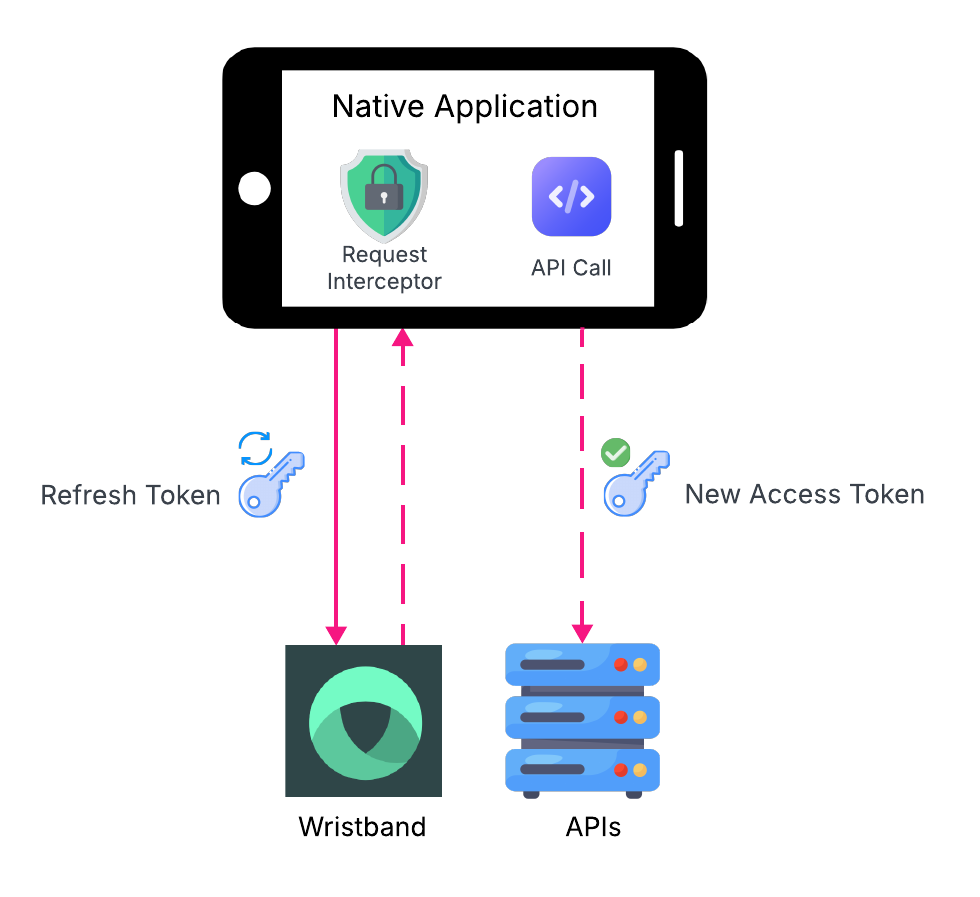
Figure 1: A native application refreshes an expired access token before making an authenticated API request.
Access Token Expiration Buffer
Access tokens should be refreshed shortly before their actual expiration time to reduce the likelihood of expiration during an API request.
When Wristband's Token Endpoint returns a token lifetime in expiresIn, the application can calculate and store an absolute expiration timestamp based on when the token was received.
For example, using a 30-second expiration buffer allows the application to treat a token as expired 30 seconds before its actual expiration time.
This provides additional time for network latency, processing delays, and minor clock differences.
Handling Concurrent Refresh Requests
When multiple API requests occur simultaneously, they may all detect an expired access token and attempt to refresh it.
To prevent unnecessary refresh requests and potential conflicts with refresh token rotation, your application should coordinate refresh operations so that only one refresh request is performed at a time.
Other requests can wait for the refresh operation to complete and reuse the newly issued access token.
Handling Unexpected Token Expiration
Even when an access token appears valid, a protected API may reject it with a 401 Unauthorized response.
If the response indicates that the access token has expired or is invalid, the application can attempt a token refresh and retry the original request using the new access token.
Refresh Token Rotation
Wristband supports refresh token rotation, a security mechanism that issues a new refresh token whenever an existing refresh token is used to obtain a new access token.
When rotation is enabled:
- The native application submits its current refresh token to Wristband's Token Endpoint.
- Wristband validates the refresh token and issues a new access token and refresh token.
- The previously used refresh token is invalidated.
- The application securely replaces the stored refresh token with the newly issued token.
Refresh token rotation helps detect and limit replay attacks involving compromised refresh tokens.
Native applications should securely store refresh tokens using platform-provided mechanisms, such as Apple Keychain or Android Keystore-backed storage. However, secure storage alone does not eliminate the risk of token theft.
Refresh Token Rotation Configuration
Wristband currently disables refresh token rotation by default for Native OAuth2 clients. However, enabling refresh token rotation can improve security for native applications.
When rotation is enabled, applications must securely persist the newly issued refresh token and ensure that subsequent refresh requests use the latest token.
Handling Refresh Failures
A token refresh request may fail for several reasons, including:
- Expired Refresh Token: The refresh token has exceeded its idle or absolute expiration time.
- Revoked or Invalid Refresh Token: The refresh token has been revoked, is malformed, or is otherwise no longer valid.
- Invalid Request: The request contains missing or incorrect parameters, such as an invalid OAuth2 client ID.
- Temporary Failures: Network connectivity issues, timeouts, or server errors prevent the request from completing.
Your application should distinguish between temporary failures and errors that require the user to reauthenticate.
Handling Temporary Failures
For temporary failures, such as network interruptions or server errors, the application can retry the refresh request using a bounded retry strategy with exponential backoff.
Retrying Requests with Refresh Token Rotation
When refresh token rotation is enabled, a network timeout may leave the application uncertain whether Wristband processed the refresh request and invalidated the previous refresh token.
To accommodate these scenarios, Wristband provides a 30-second reuse interval for refresh tokens. During this window, a previously used refresh token can be reused without triggering refresh token reuse detection.
This allows applications to safely retry a failed or timed-out refresh request within 30 seconds of the original successful refresh.
After the reuse interval expires, attempting to use the previous refresh token may trigger reuse detection and invalidate the active refresh token family.
To minimize potential issues, applications should:
- Retry Promptly: Retry failed refresh requests within the 30-second reuse interval when appropriate.
- Store New Refresh Tokens: When a refresh response includes a new refresh token, securely replace the previously stored token.
- Coordinate Concurrent Requests: Ensure only one refresh operation runs at a time to prevent unnecessary refresh requests and token conflicts.
Handling Invalid or Expired Refresh Tokens
If Wristband rejects the refresh token because it has expired, been revoked, or is otherwise invalid, the application can no longer use it to obtain new access tokens.
In this scenario, the application should clear its local authentication state and require the user to authenticate again.
Depending on your application's security and user experience requirements, you can handle reauthentication in two ways:
- Reauthenticate Without Terminating the Wristband Session: Initiate a new authorization flow without calling Wristband's Logout Endpoint. If the user still has a valid Wristband authentication session, Wristband may automatically authenticate them without requiring them to enter their credentials again.
- Full Logout and Reauthentication: Clear the application's local authentication state and open Wristband's Logout Endpoint to terminate the existing browser authentication session. The user must then authenticate again to establish a new session.
Updated 16 days ago