
Just In Time (JIT) Provisioning
Enable Just-In-Time (JIT) provisioning to automatically create or update Wristband users during enterprise identity provider login.
Just-In-Time (JIT) Provisioning automatically creates or updates a user account at the exact moment of authentication. When a user logs in through a configured enterprise external identity provider, Wristband parses the roles, groups, and profile data contained within the SSO assertion to instantly update or generate their user record. This eliminates manual onboarding workflows and ensures user directories stay continuously synchronized.
Enabling JIT Provisioning
Just-in-Time (JIT) Provisioning applies exclusively to Wristband's enterprise external identity providers and is not supported for social login providers.
To activate this feature:
- Open the Tenant View in the Wristband dashboard.
- Select Identity Providers > Enterprise from the side navigation menu.
- Click the specific enterprise IdP you want to configure.
- Scroll down to the User Syncing section and toggle on Just-in-Time (JIT) Provisioning.
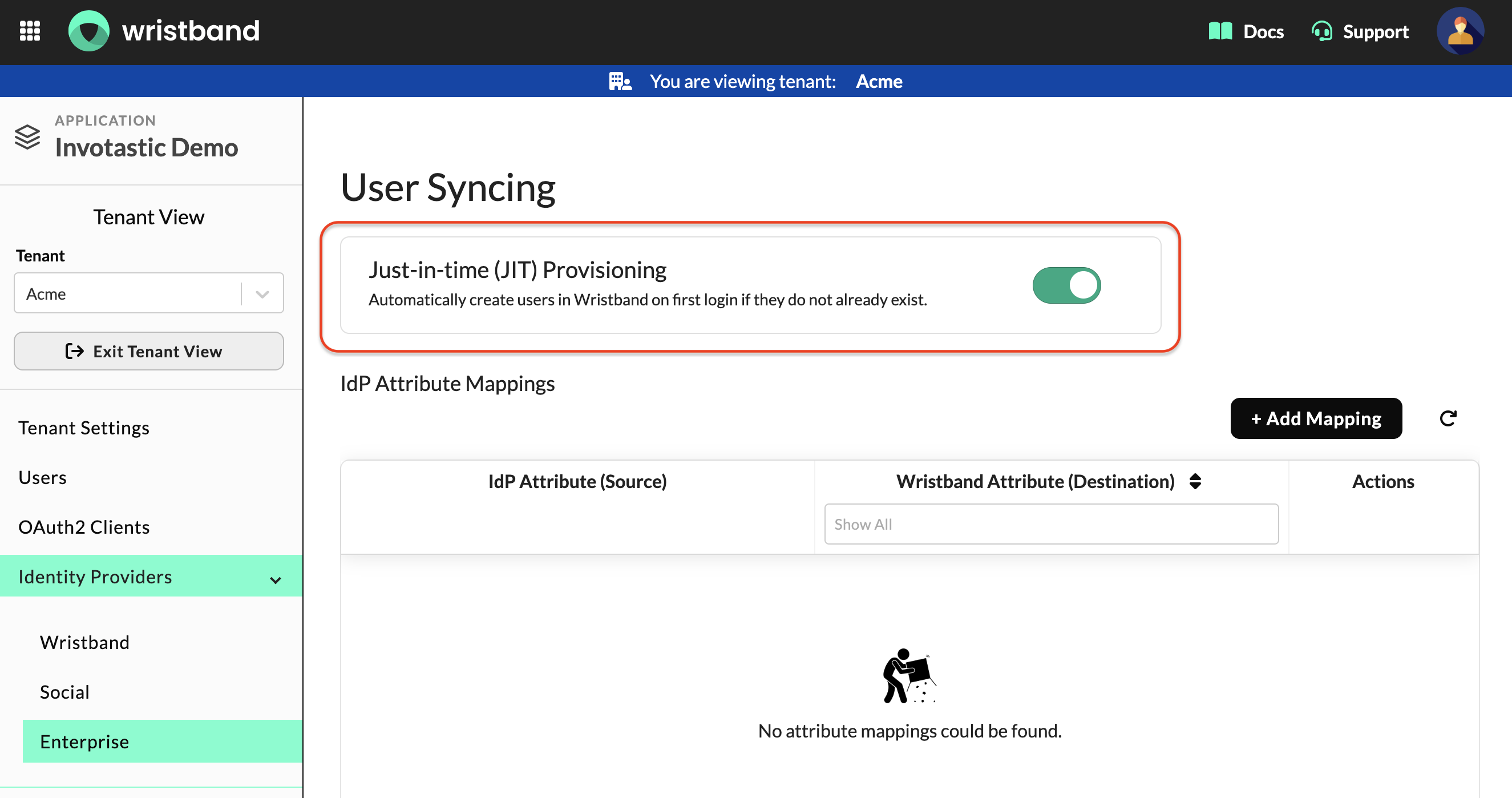
Figure1: The User Syncing section of an enterprise IdP, showing the Just-in-time (JIT) provisioning toggle.
Mapping External IDP Users
With Wristband, you can map both user attributes and roles directly from your external identity provider.
Attribute Mapping and Syncing
Use attribute mapping to map incoming SAML assertions to core fields on the Wristband user profile. Wristband leverages these mappings to sync profile values in real time during login and JIT provisioning. Note that mapping is not required for OIDC identity providers, which sync natively using standard claims.
Learn more in the Attribute Mapping and Syncing guide.
Role Mapping
Role mapping maps a user's security groups or roles from an external identity provider to custom roles within your Wristband application. This automates access control, ensuring users are instantly granted the correct level of permissions based on their organizational roles upon logging in.
Refer to the Role Mapping documentation to learn more.
Email Verification
External identity providers typically do not guarantee that a user's email address is verified—that verification fallback falls to Wristband. During Just-In-Time (JIT) provisioning, Wristband evaluates the incoming SSO assertion to determine if the enterprise IdP explicitly verified the email. If the IdP confirms verification, Wristband sets the user's emailVerified profile attribute to true. If verification status cannot be determined or is flagged as unverified, Wristband automatically triggers its own email verification workflow for the user.
Email Verification Workflow Policy
If email verification is required during JIT provisioning, users can complete it in two ways:
- Entering a one-time password on the login screen.
- Completing login and confirming through a verification email sent to their inbox.
To manage how email verification behaves, navigate to the Enterprise IdP Login (SSO) section under Workflow Policies in the Wristband dashboard. This policy allows you to control the strategy used when an unverified email is processed.
For full configuration details, see the Login Workflow documentation.
JIT Provisioning Workflow
The following is a high-level flow of how JIT provisioning works in Wristband:
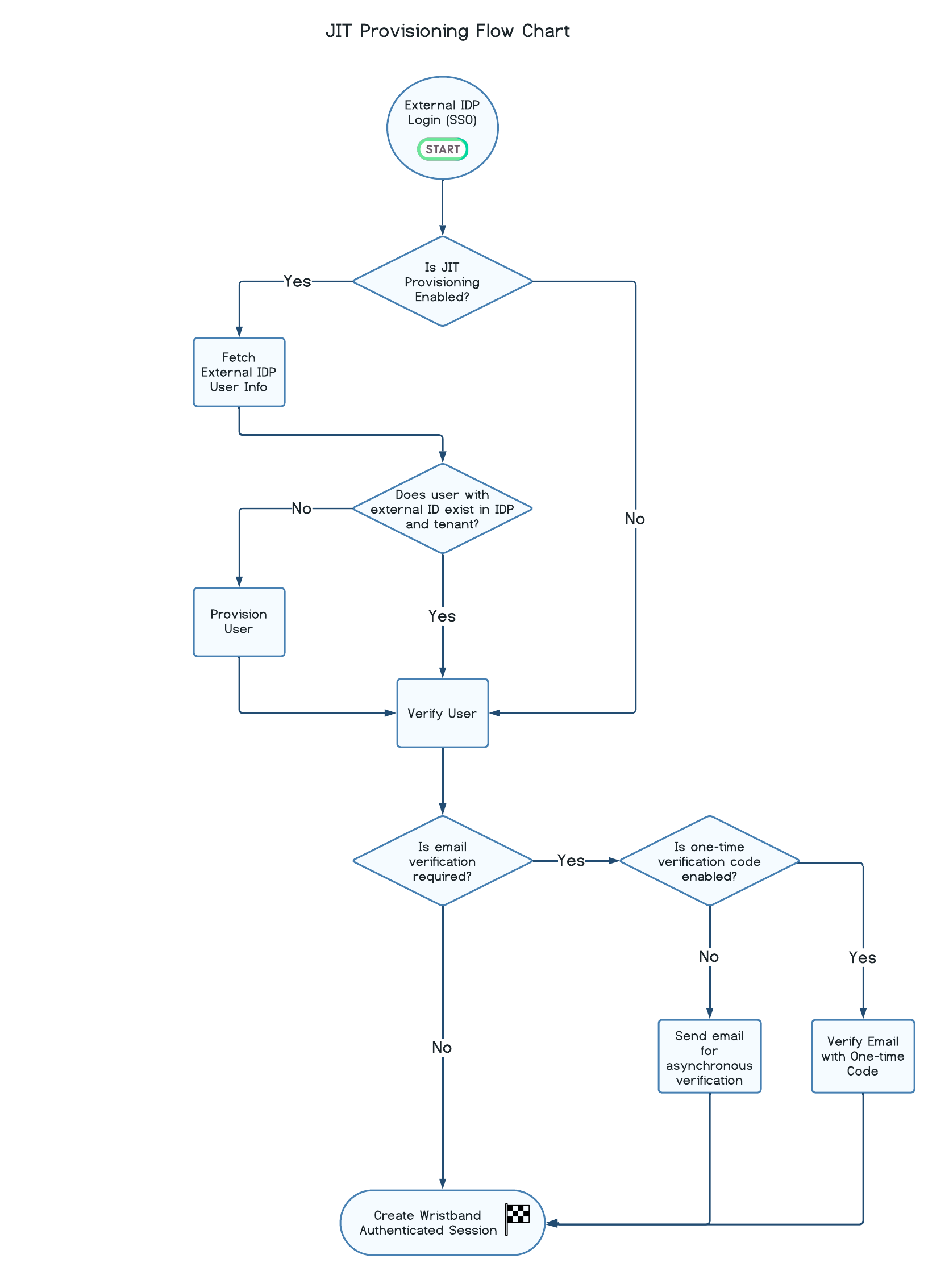
Figure 2: JIT provisioning flow, from external IdP login through user provisioning, email verification, and session creation.
Wristband automatically provisions new users on demand if no matching record is found for the given tenant and identity provider. If the login triggers an email verification requirement, the workflow prompts the user for a one-time code or email confirmation prior to session creation.
You can trace this complete authentication sequence in the Login: Wristband Hosted-UI overview.
Updated about 19 hours ago